What's the "big deal" about Data Lakehouses?
A Data Lakehouse is a modern data architecture that combines the best of both worlds from Data Lakes and Data Warehouses. It addresses the limitations of these traditional approaches while leveraging their strengths. In simple terms, a Data Lakehouse combines the speed and format flexibility of a Data Lake with the structured nature and ACID capabilities of a Data Warehouse.
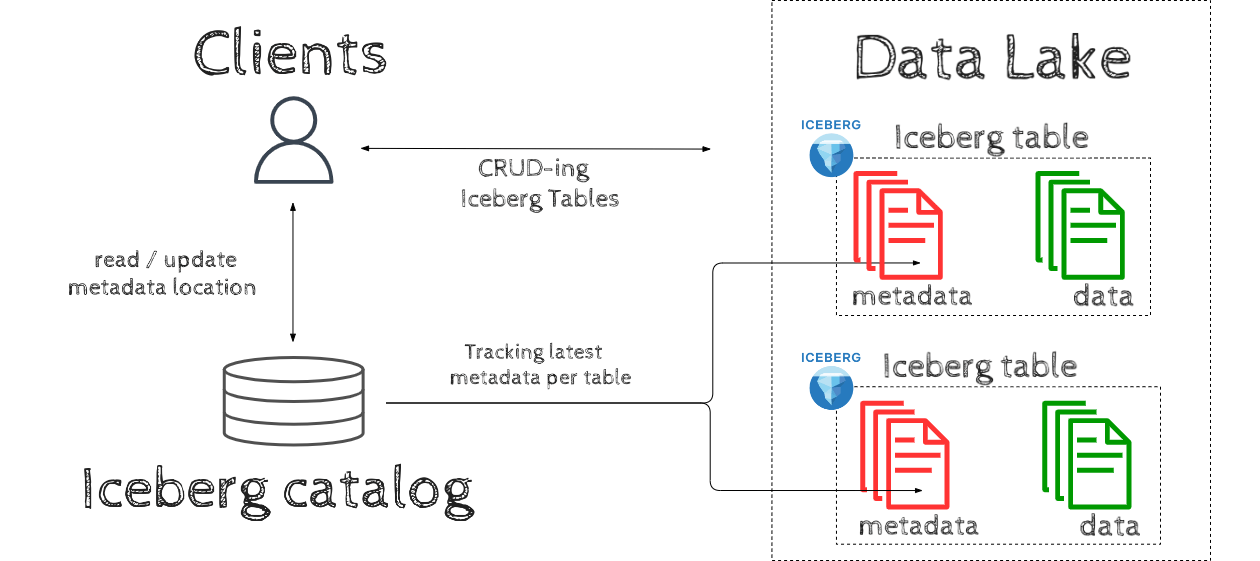
Apache Iceberg is an Open source Table format designed to work at a petabyte scale. An Iceberg-based Data Lakehouse ecosystem consists of the following components:
- Data Lake acting as high volume storage for our Iceberg Tables ie. S3/GCS/ADLS/HDFS
- Tables stored in Iceberg Table format on a Data Lake
- Iceberg Catalog tracking the latest version of each Iceberg table. Catalog is an entrypoint for clients to interact with Iceberg tables, it keeps the location of latest metadata per table. Among the most popular Iceberg Catalogs options there is Glue, Nessie, Hive Metastore.
- Clients interacting with our Iceberg Tables ie. Spark / Flink / Dremio or applications using Iceberg native Java / Python API's.
What's an Iceberg 🧊 doing in my Data Lake?
Iceberg table format plays a crucial role in our Data Lakehouse architecture, introducing robust functionalities that elevate the capabilities of a Data Lake to new heights. Below are the key attributes that Iceberg brings to Data lakes:
| Feature | Description |
|---|---|
| ACID transactions | Updates/Appends/Deletes become transactional for Data Lakes |
| Structure | Brings Structure to your data for Analytics similar to Data Warehouses |
| Format flexibility | Allows various data formats including parquet, avro, orc |
| Performance | Faster table scanning & efficient filter/predicate pushdown |
| New features | Schema evolution, Partitioning specification evolution, time travel, rollback |
| Concurrency safety | Multiple processes/engines accessing and modifying the same data is safe |
Demystifying Iceberg
Given the relatively recent emergence of the Apache Iceberg table format, there are various common misunderstandings around this project. Let's demystify these misconceptions and highlight essential facts about Apache Iceberg.
| Myth | Fact | |||
|---|---|---|---|---|
| ❌ | Iceberg is a file format | Iceberg is a table format which includes: metadata files in json & avro formats, data files in parquet, avro or orc formats | ✅ | |
| ❌ | Iceberg is a storage engine | Iceberg Tables are stored on Data Lake | ✅ | |
| ❌ | Iceberg is an execution engine | We use Engines like Spark/Dremio/Flink or Java/Python API's to interact with Iceberg tables | ✅ | |
| ❌ | Iceberg is a service | Clients are reading Iceberg Tables directly from Storage | ✅ |
Apache Iceberg vs Hive Table format
Iceberg project was launched by Netflix in 2017 with primary motivation to overcome limitations of Apache Hive. Iceberg beats Hive performance-wise while also providing ACID transactions and a set of additional Iceberg features including time travel and partitioning specification evolution.
| Feature | Apache Hive | Apache Iceberg |
|---|---|---|
| Table contents tracking | Table contents are tracked on directory level, listing directory files takes a long time which slows down query planning | Table is represented as a list of files, which means that files are tracked on file level instead of directory level, this speeds up query planning because the list of files is known |
| ACID support | ACID updates/deletes supported only for Bucketed, Managed, ORC tables. Appending rows is not transactional, a common workaround is to override the whole partition. | Iceberg has ACID transactions support, state of table is always consistent, this enables safe updates, deletes, appends. |
| Concurrency safety | Due to limited ACID support, multiple processes writing to the same table in parallel is often not a safe operation. | Iceberg uses "optimistic concurrency", parallel updates by multiple processes is safe, but might result in rewriting parts of metadata. |
| Hidden partitioning | No support, partitioning by ie. year/month/day requires 3 separate columns to be present in the table | Supported, partitioning by ie. year/month/day can be done by keeping only single date column |
| Table statistics | Often stale which results in inefficient planning | File stats on two levels: partitioning column statistics in manifest list, non-partitioning column stats in manifest file |
| Filter Pushdown | 1 level: partitioning columns(directories) 2 level: parquet file statistics |
1 level: partitioning columns(manifest list) 2 level: non-partitioning columns(manifest file) 3 level: parquet file statistics |
| Schema evolution | ✅ | ✅ |
| Partitioning evolution | ❌ | ✅ |
| Time travel | ❌ | ✅ |
| Compaction | ❌ Support only for ORC tables | ✅ rewriteDataFiles |
| Migration tools | ❌ Migration done by 3rd party tools | ✅ add_files, migrate, register_table |
Iceberg Architecture
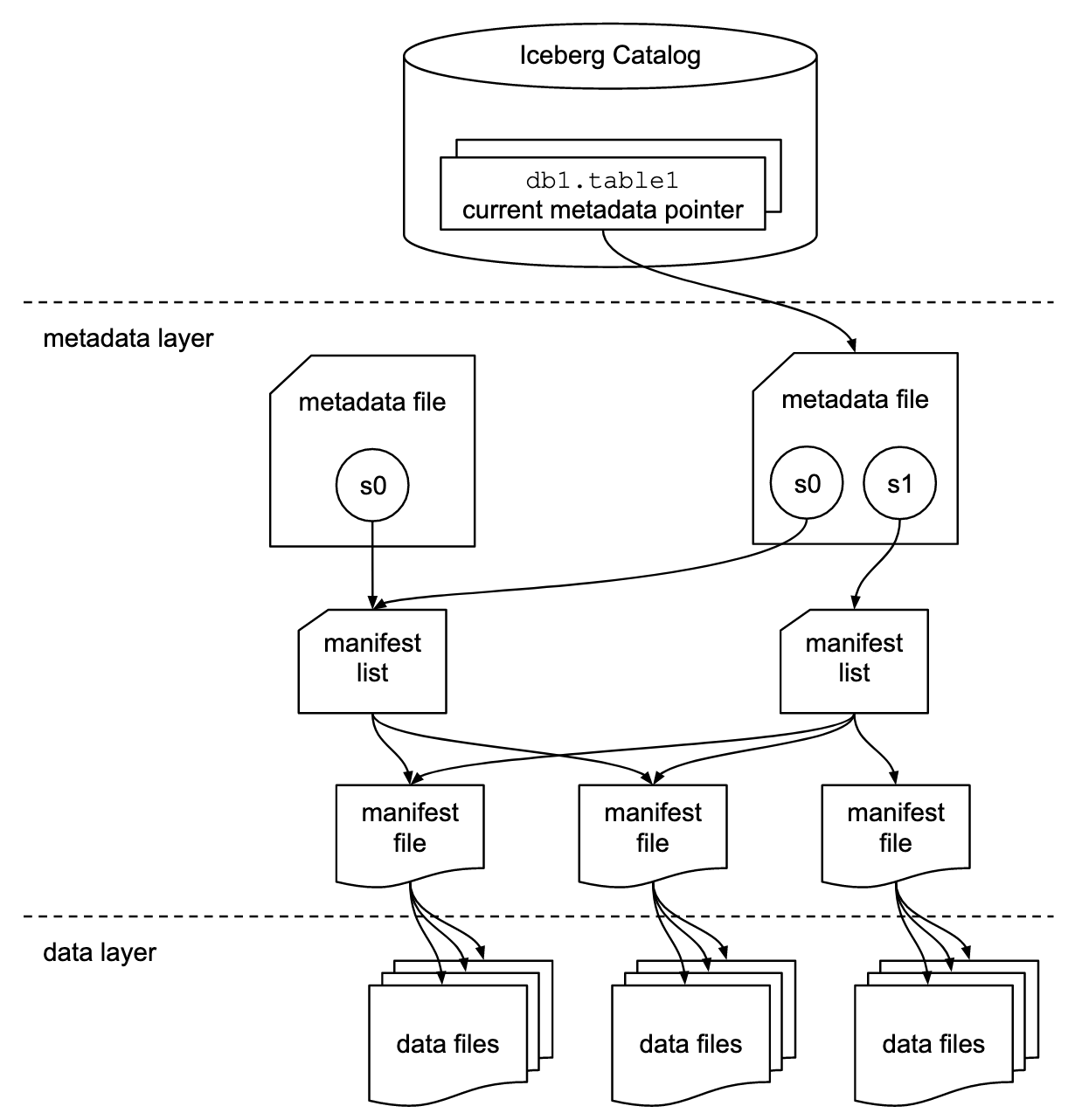
Iceberg architecture consists of 3 layers: Iceberg Catalog, Metadata Layer & Data layer. While there's nothing extraordinary to Iceberg Catalog and Data layer, it's the Metadata layer that separates Iceberg from other Table formats.
Iceberg catalog
Iceberg catalog is an external service whose primary responsibility is to keep track of the latest metadata.json file for each table. Clients read the location of the latest metadata.json from Iceberg Catalog and update it if the state of a table has changed. Although various tools can be used as Iceberg Catalog including Glue, Nessie, Hive Metastore, a strict requirement is that the catalog should be transactional to support atomic updates of metadata location. We need to choose an option which is compatible with our data lake and is supported by engines/clients used in our environment.
| Metadata Layer |
|---|
In Iceberg tables, metadata is stored alongside data on a data lake. We can distinct 3 levels of metadata:
|
Data layer
The data layer is the simplest layer of Apache Iceberg Table format. Data Files are stored on a data lake and are tracked by manifest files. Iceberg supports Parquet, Avro and Orc as data file formats.
Iceberg in Action
Now that we've gone through Iceberg Architecture, let's take a look under the covers and study how data in Iceberg format is being written/read during CRUD operations. For executing queries we will be using Spark.
Creating table
Let's create an empty Iceberg table partitioned hourly with the following CREATE TABLE statement:
CREATE TABLE store.transaction (
    transaction_id BIGINT,
    customer_id BIGINT,
    product_id BIGINT,
    price DECIMAL(10, 2),
    ts TIMESTAMP
)
USING iceberg
PARTITIONED BY (HOURS(ts))
The results of running the CREATE TABLE statement are presented below, the left side presents logical state of table while right side shows physical layout on Data Lake.
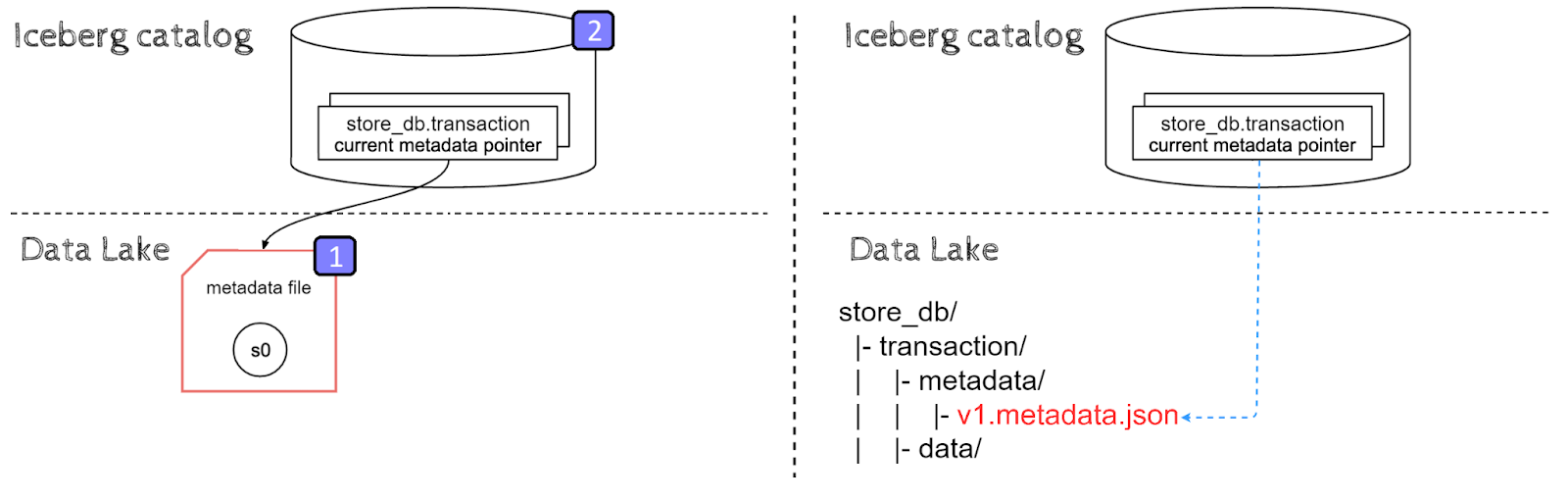
Table creation can be divided into the following steps:
- New metadata.json file is created with an empty snapshot s0. There is no data yet in our table, hence no manifest files and therefore no manifest lists.
- An entry with metadata.json location for store_db.transaction table is created in Iceberg catalog to reference the new metadata file.
Inserts
Now that we've created a table, let's insert some sample data to our table:
INSERT INTO store.transaction VALUES
(1, 123, 1006, 36.17, TIMESTAMP('2023-06-23 07:10:23')),
(2, 345, 1006, 36.17, TIMESTAMP('2023-06-23 07:11:25')),
(3, 456, 1541, 99.99, TIMESTAMP('2023-06-23 07:12:27'))
Data ingestion in Iceberg starts by creating data files, then metadata layers are built on top of that data. Last but not least, the pointer to the latest metadata.json file location is updated atomically.
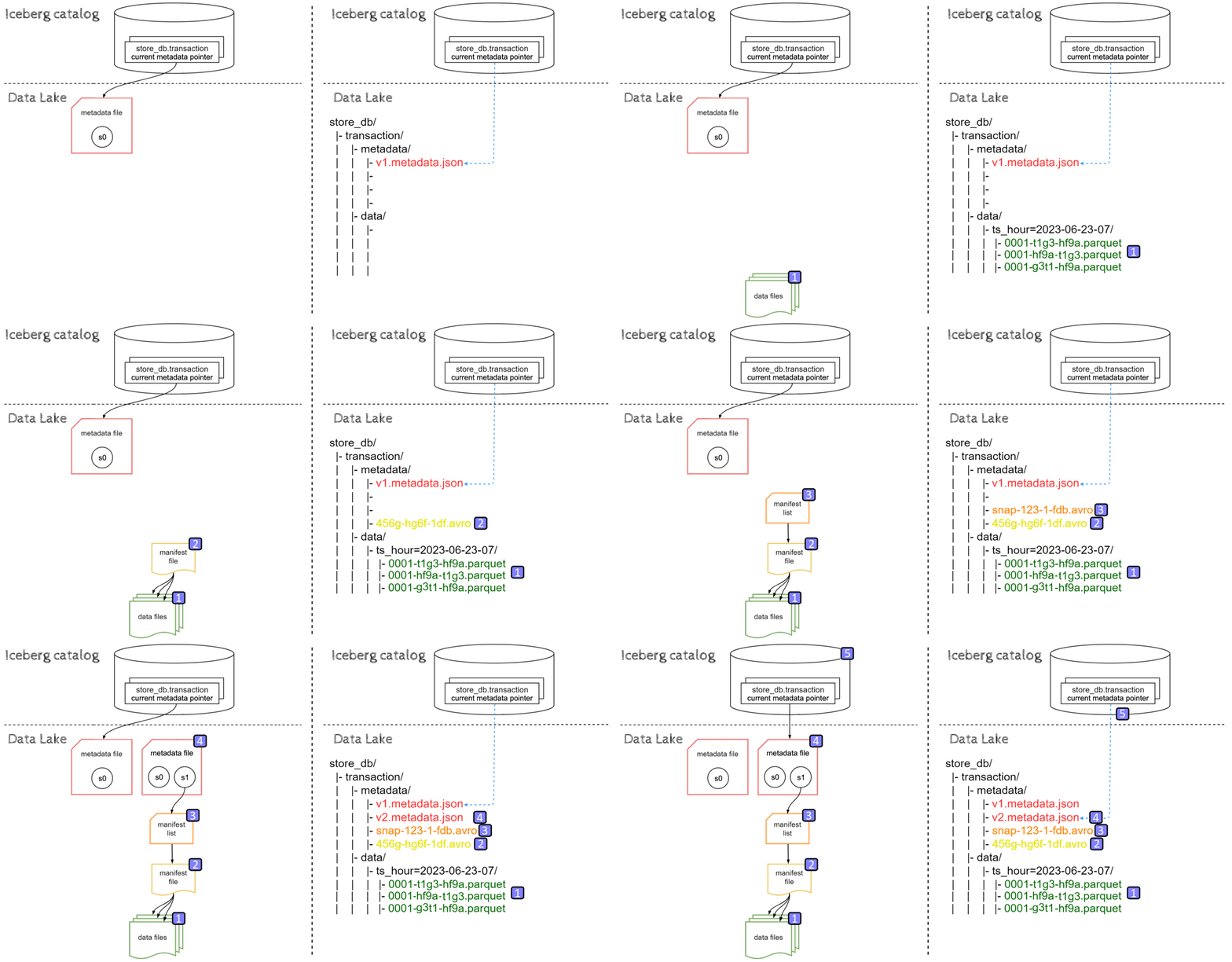
We can divide data ingestion into the following steps:
- New data files(parquet) are ingested into respective partition directories on a Data lake
- Manifest file pointing to those data file are created (with data file-level stats)
- Manifest list referencing this manifest file is written (with partition-level stats)
- New Metadata file is created with old snapshot s0 and a new snapshot s1, pointing to the new manifest list
- Metadata location for store_db.transaction is updated to reference the new metadata json file.
Due to hidden partitioning, timestamp values '2023-06-23 07:mm:ss' were correctly turned into partitioning column value '2023-06-23-07' and the respective partition directory was created with files inside. Please note that such a query doesn't necessarily need to create three files.
To understand the process even better, let's insert one more row:
INSERT INTO store.transaction VALUES
(4, 789, 221, 72.37, TIMESTAMP('2023-06-23 20:10:23'))
This time we are inserting into a new partition: '2023-06-23-20', let's view the result:
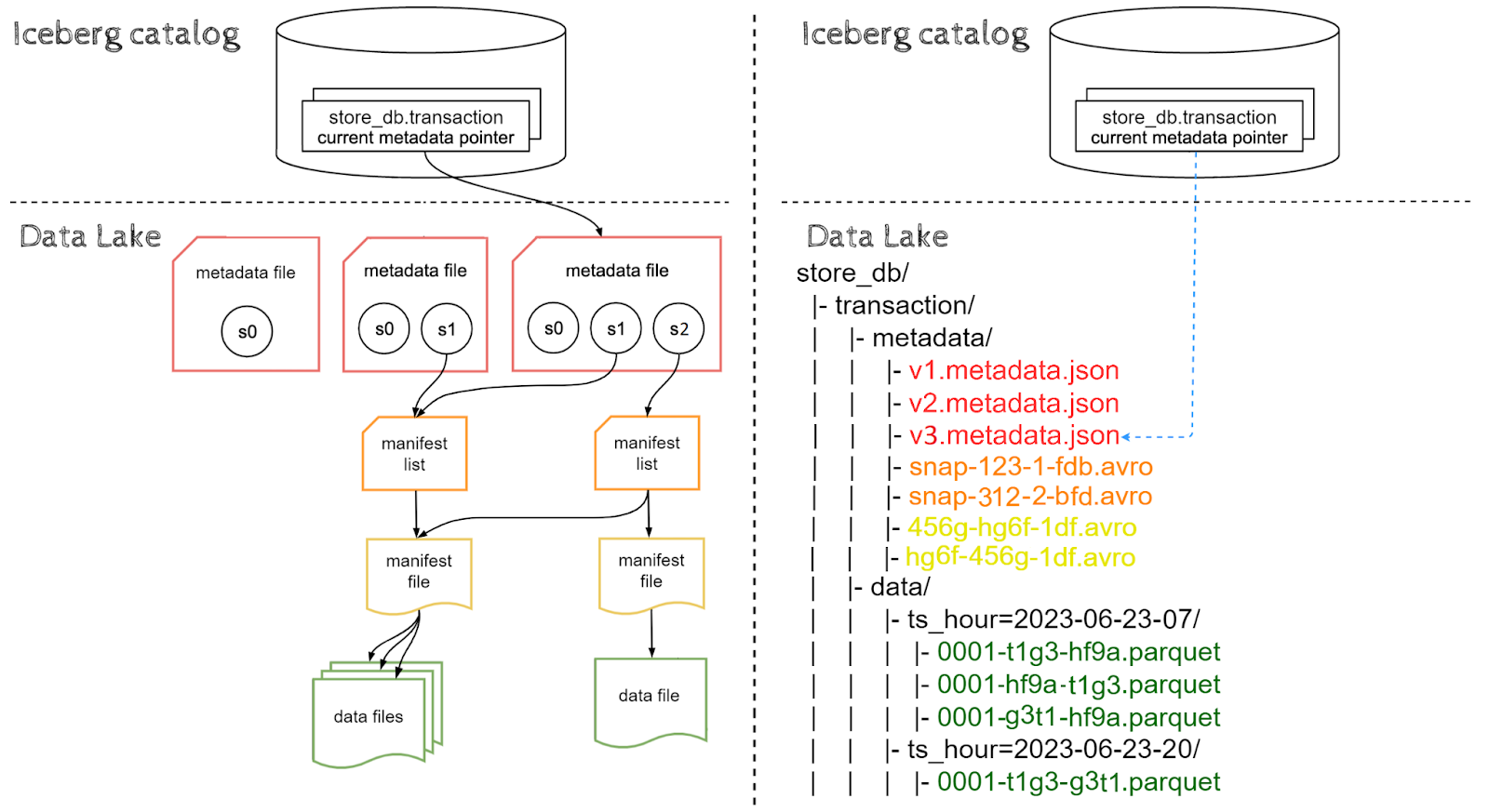
As expected, a new partition directory '2023-06-23-20' was created with a data file ingested inside. Metadata layers were built on top of data in the same way as for the previous insert, however this time the manifest list points to both old and new manifest files. Why is that? Well, this is expected behavior, because we are inserting new data and not updating or deleting old data, the new manifest list inherits paths to old manifest files.
Reads
Let's try to read our Iceberg table using the following select query:
SELECT customer_id, transaction_id, price
FROM store.transaction
WHERE ts BETWEEN '2023-06-23 07:00:00' AND '2023-06-23 07:59:59'
AND product_id = 1006
Reading Iceberg tables is performed in the opposite direction compared to inserting data.
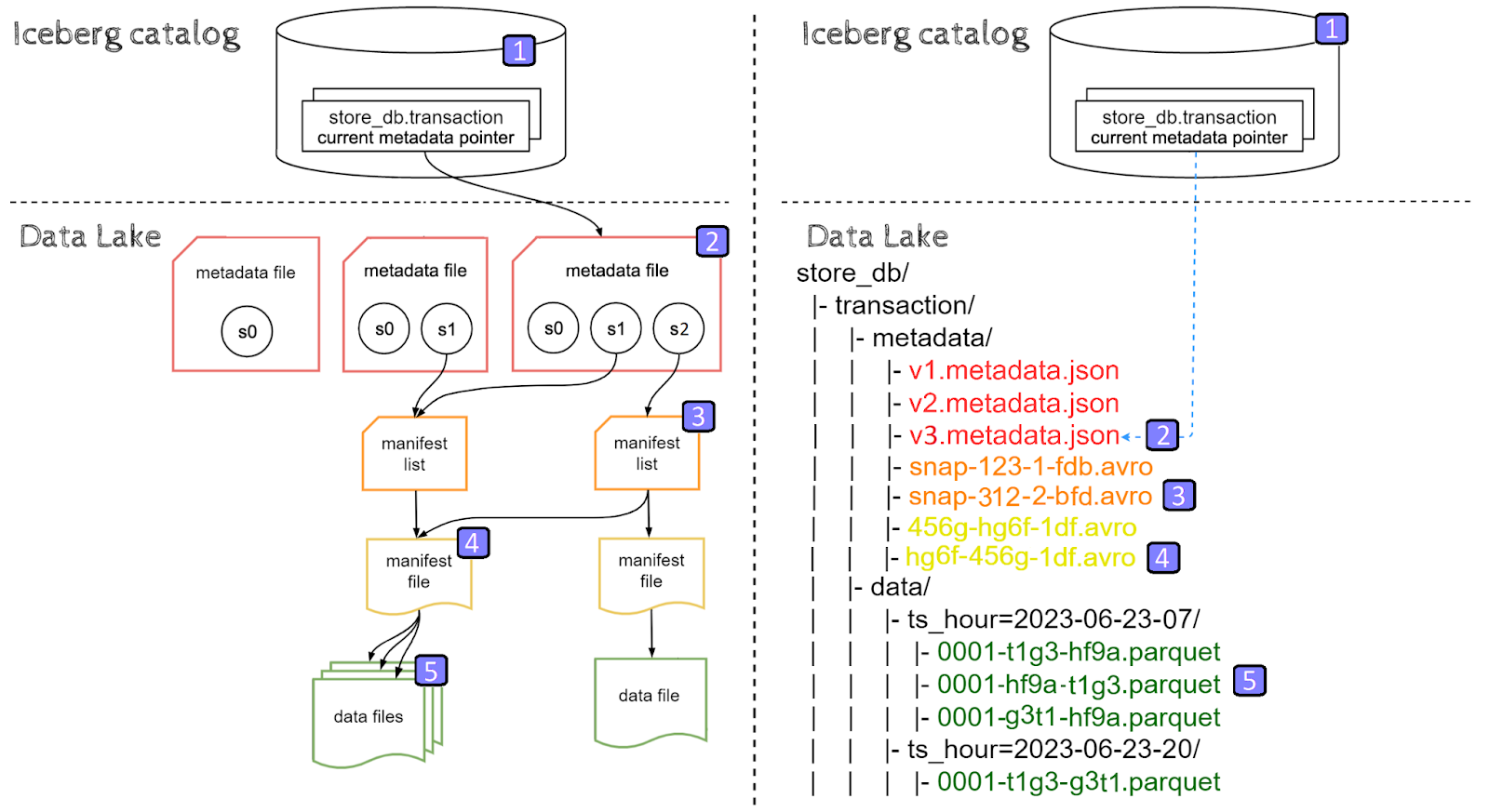
- The client goes to the Iceberg catalog and retrieves the latest metadata file location entry for store.transaction table
- Metadata file is opened and manifest list location for the current snapshot is retrieved
- Manifest list is opened, filters on partitioning columns are applied, hence filtering out partitions other than
'2023-06-23-07', finally location of the remaining manifest file is retrieved - Manifest file is opened, filters on non-partitioning columns are applied, hence filtering out data files which doesn't satisfy
product_id = 1006filter and retrieving the locations of the remaining data files - Data files are read, and since we're selecting three columns: customer_id, transaction_id, price, only those three columns are read from parquet files by the client
Time travel
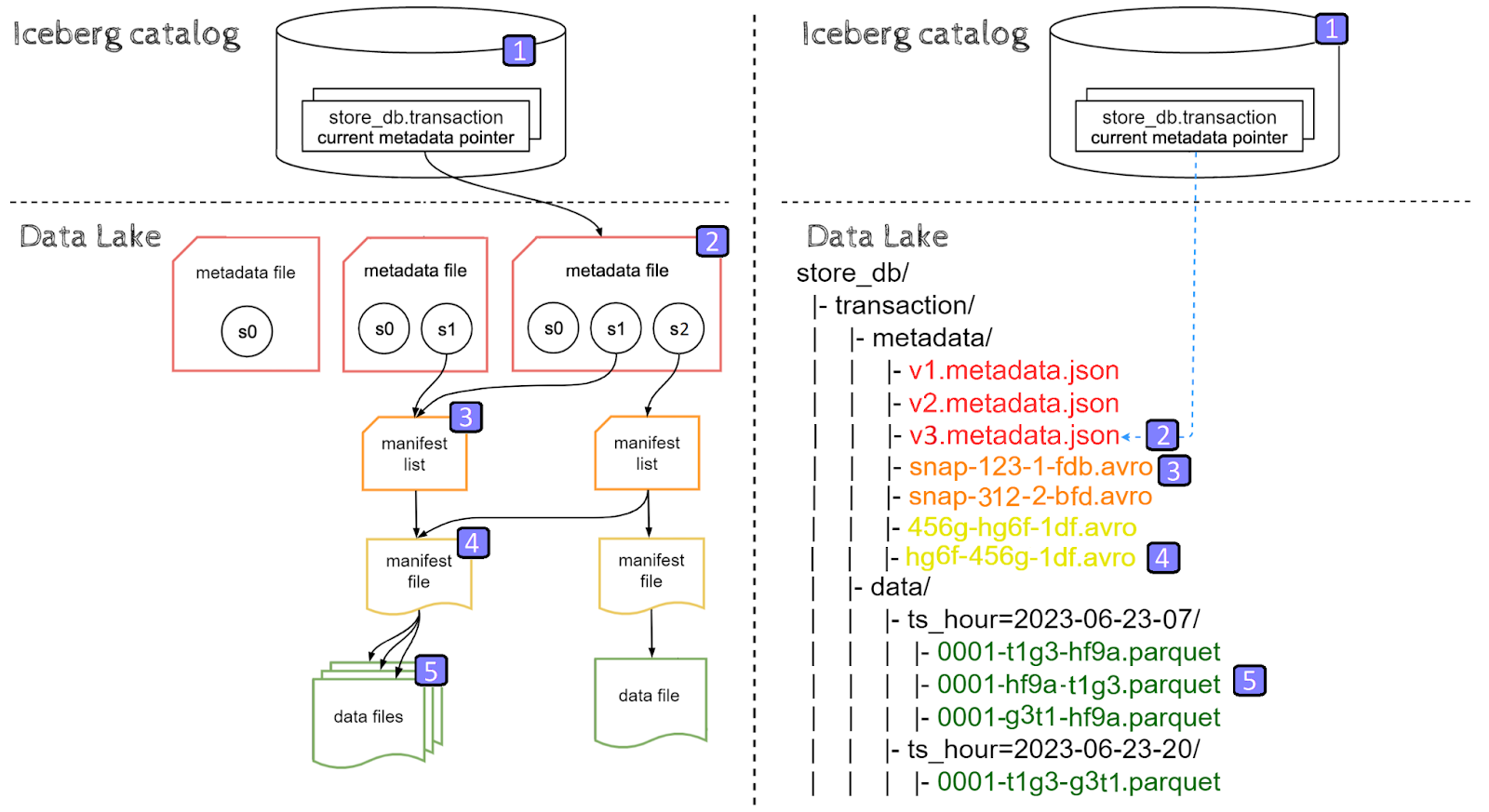
Iceberg's architecture enables time travel, time travel is a powerful feature that allows the user to query a historical snapshot of the table without any performance impact as compared to reading the latest snapshot.
Let's try to read a historical snapshot s1 of our Iceberg table using time travel by timestamp:
SELECT customer_id, transaction_id, price
FROM store.transaction
TIMESTAMP AS OF ''
We can also time travel by snapshot id, snapshot ids can be viewed using metadata functions.
SELECT customer_id, transaction_id, price
FROM store.transaction
VERSION AS OF ''
With time travel, we are still reading the latest metadata.json file, however this time we are picking snapshot s1 instead of latest snapshot s2, hence a different manifest list is being read. The manifest list for snapshot s1 points only to a single manifest file and therefore files for partition 'ts_hour=2023-06-23-20' are not being read.
CREATE TABLE AS SELECT (CTAS)
Now that we've explored the internals of CREATE, INSERT and SELECT queries, it's time to take a deep dive into UPDATE queries. To better highlight the behavior for row-level updates, let's create a new table representing diving products using the following CTAS statement:
CREATE TABLE store.product_diving
USING iceberg
AS SELECT product_id, product_name, price
FROM store.product
WHERE category='sport' AND sub_category='diving'
Because we expect this table to be relatively small, we are not partitioning it, as a result, files are stored in the top level data directory.
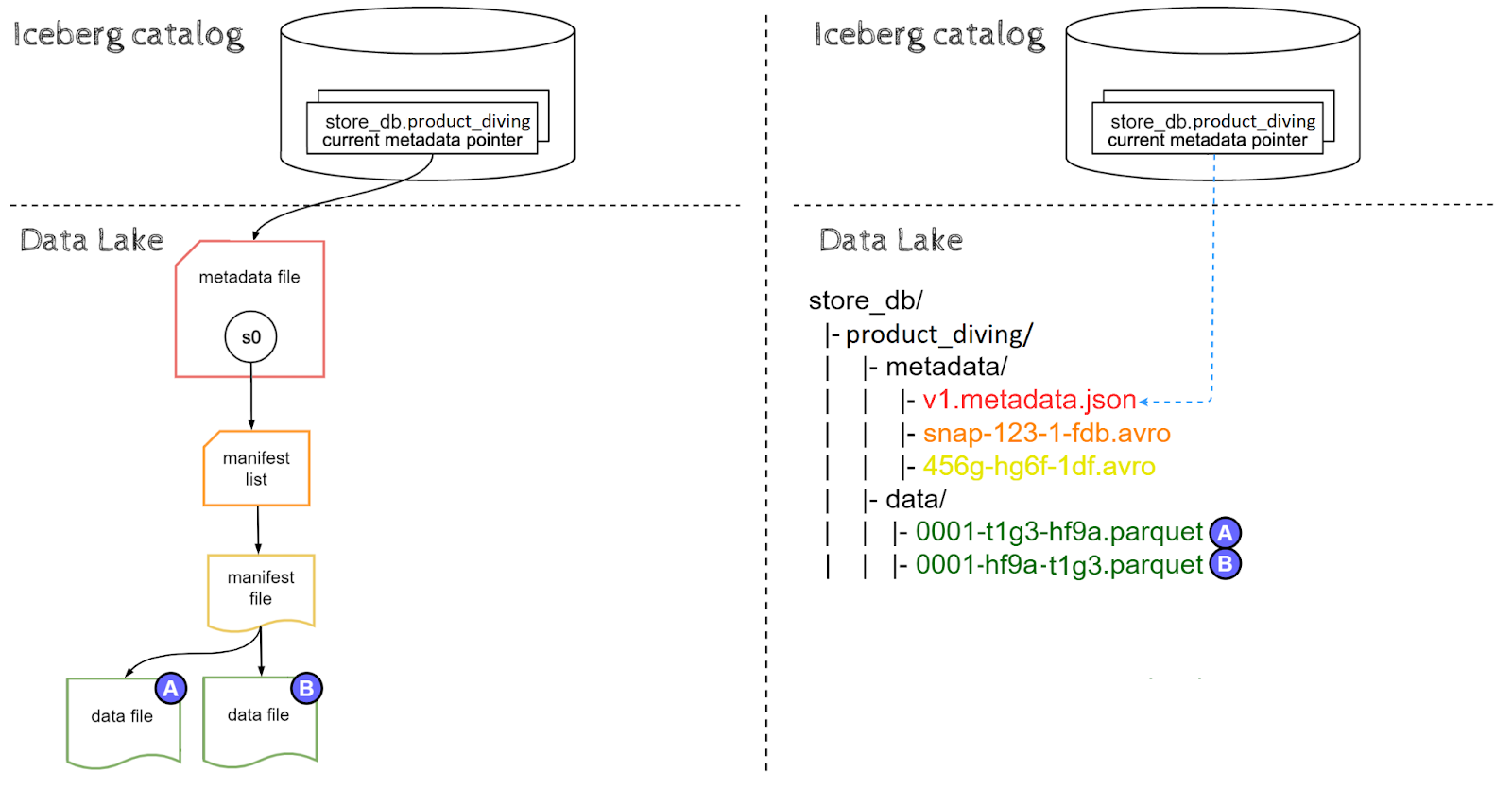
CREATE TABLE AS SELECT statement has created an Iceberg table in a similar fashion to CREATE and INSERT queries combined, however CTAS statement results in a single snapshot s0 instead of s0 & s1.
Let's assume the following contents of the data file (A):
+----------------+----------------+----------------+
|   product_id   |  product_name  |      price     |
+----------------+----------------+----------------+
|       1        |    swimsuit    |     99.99      |
+----------------+----------------+----------------+
|       2        |    flippers    |     49.49      |
+----------------+----------------+----------------+
and the data file (B):
+----------------+----------------+----------------+
|   product_id   |  product_name  |      price     |
+----------------+----------------+----------------+
|      3         |   snorkel      |     29.99      |
+----------------+----------------+----------------+
Updates
Imagine we want to discount the price for swimsuits from 99.99 to 79.99. Note that swimsuit product exists in data file (A). We can do it with the following query:
UPDATE store.product_diving
SET price=79.99
WHERE product_name='swimsuit'
There are two strategies for updating and deleting files in Iceberg Tables: copy-on-write and merge-on-read. For the sake of this article we will focus on the default copy-on-write approach.
Update query creates a new snapshot s1, which inherits some of the data files from previous snapshot s0, while others get copied into memory and modified:
- data files containing updated rows (A) are read into memory, have their values in-memory updated and are written as new files (C). After the update, data file (A) is no longer part of the latest snapshot s1 of the table, however it is still part of s0 and can be read through time travel.
- data files which do not contain updated rows (B) are simply referenced by the new manifest file (no copying).
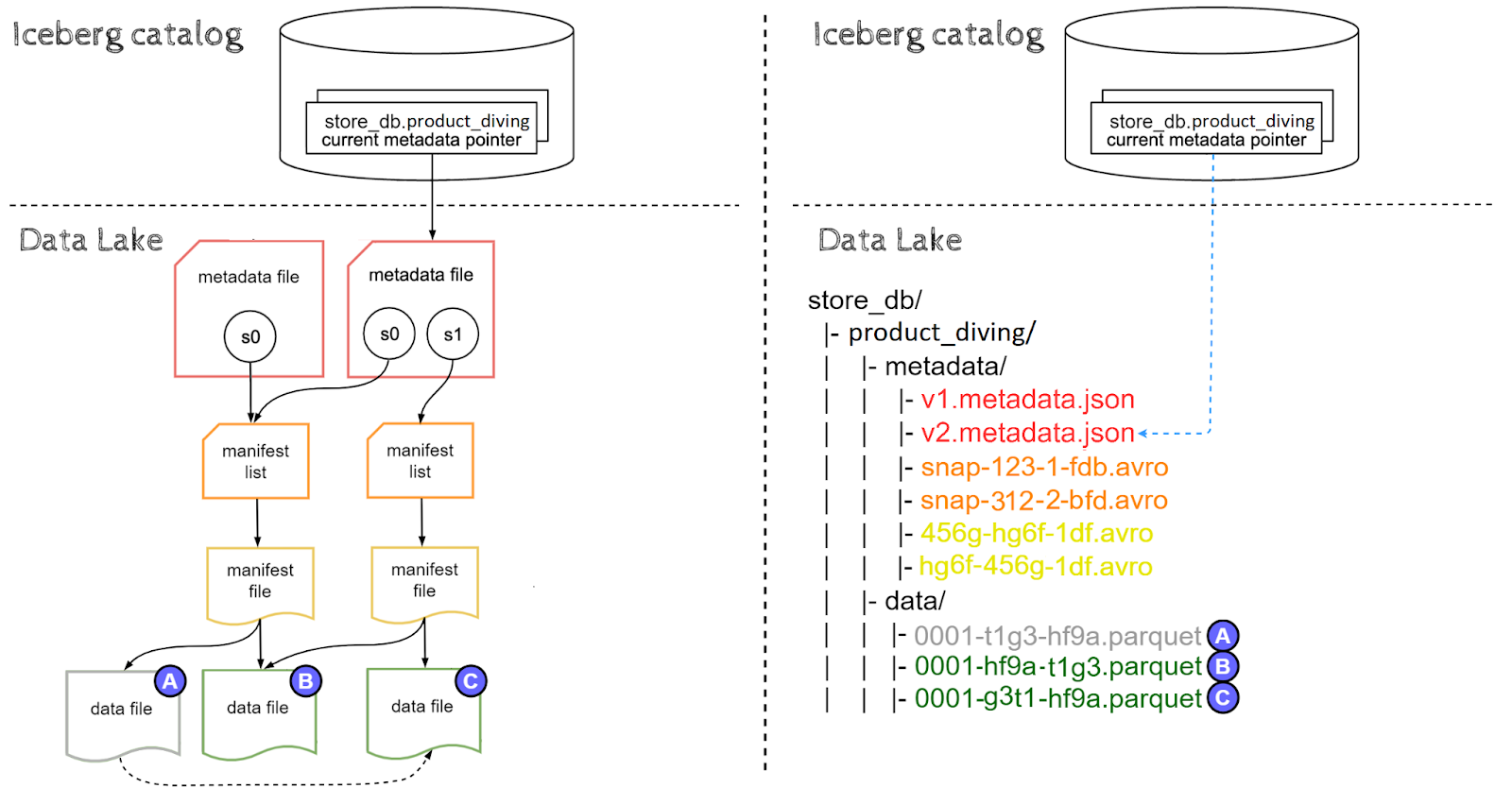
As you've probably noticed, with copy-on-write strategy updating records in Iceberg results in partial data duplication. This can be either a significant or marginal problem depending on what is the proportion of updates to inserts for your table. Data file (A) will become orphaned and physically deleted once all snapshot referencing it get expired, in our case this means expiring snapshot s0. Snapshot expiration policies are not subject of this article but will be discussed in later parts of Iceberg Data Lakehouse series.
Comparing Iceberg with Delta and Hudi

When it comes to open-source table formats, Apache Iceberg, Delta and Apache Hudi have all made significant strides in the industry. Although each format brings its own set of functionalities and advantages to the table, Iceberg sets itself apart through its unique combination of features. Let's take a look at a detailed comparison of these technologies.
| Feature | Apache Iceberg | Apache Hudi | Delta |
|---|---|---|---|
| ACID support | ✅ | ✅ | ✅ |
| Schema evolution | ✅ | ⚠️ *only from spark | ✅ |
| Partitioning evolution | ✅ | ❌ | ❌ |
| Time travel | ✅ | ✅ | ✅ |
| Compaction | ✅ Rewrite Data Files | ✅ Compaction Service | ❌ |
| Migration tools | ✅ Add Files, Migrate, Register Table | ✅ Bootstrapping | ✅ Convert to Delta |
| Snapshot management | ✅ Expire Snapshots | ✅ Cleaning Service | ✅ Vacuum |
| CLI | ❌ | ✅ | ✅ |
| Data Quality validation | ❌ | ✅ Pre-commit Validators | ✅ Constraints |
Iceberg's Distinctive Features
- Partitioning Specification Evolution: While schema evolution is a commonplace feature for modern data warehouses, Iceberg remains the only open table format supporting partitioning specification evolution. Partitioning specification is specified during table's creation, typically considering data characteristics and query patterns. However, shifts in data volume and query patterns can render the initial partitioning specification ineffective. Here, partitioning specification evolution comes into play, enabling the modification or addition of partitioning columns without table migration.
- Format Flexibility: Iceberg's support for multiple file formats, including Parquet, Avro, and Orc, gives users the freedom to choose the format that best suits their specific use case. As of now, Apache Hudi doesn't have ORC support and Delta enforces Parquet format.
- Read and Write Support by Dremio: Dremio, a data lake engine that enables high-performance query processing on various data sources, provides comprehensive(read/write) Iceberg support. Whether you're utilizing Dremio or not, this feature could be a game-changer or inconsequential. As of now, Delta sources are read-only and there's no support for Apache Hudi.
Iceberg's Limitations
- CLI Absence: Unlike some of its counterparts, Iceberg lacks a command-line interface. While this may not be a deal-breaker, a CLI can significantly enhance user experience by providing an easy way to manipulate data. In order to interact with Iceberg Tables we need to either use engines ie. Spark/Dremio, or write our own applications using Java and Python native Iceberg API's.
- Data Quality Validation: Data quality validation may be an important aspect of data management, ensuring that the information used for analysis is accurate and reliable. Unfortunately, Iceberg does not offer native support for data quality validation, potentially necessitating the integration of third-party solutions.
Final Reflections
I trust that through this article, we have effectively communicated the idea that integrating an Iceberg-based Data Lakehouse can impart substantial value to a data lake while preserving its performance. Furthermore, we have conducted an in-depth exploration of Iceberg's underlying architecture and its behavior beneath the surface during CRUD operations. Comparing Iceberg with Hive, Delta and Apache Hudi highlighted Iceberg's unique set of features.
Ready to Build an Iceberg Data Lakehouse?
Let's discuss how we can help you implement Apache Iceberg and modernize your data platform for scalable, high-performance analytics.